- Most LinkedIn profiles read like a form someone filled in and forgot. ChatGPT can fix that in an afternoon.
- Your headline and About section have the highest impact. Start there before anything else.
- The output only works if you give ChatGPT real context: actual results, real goals, your specific voice.
- LinkedIn is both a search engine and a social feed. ChatGPT helps you optimize for both, not just one.
- One good post per week beats five posts and then silence. Use ChatGPT to make consistency easy.
Most people on LinkedIn have a profile that looks like a form someone filled out in 30 minutes and never touched again. A job title. A few bullet points copied from the resume. An About section that opens with "I am a results-driven professional." Nobody reads it. Nobody reaches out based on it.
That's not a personal failure. Writing about yourself is genuinely uncomfortable, and most people don't know what to say or how to say it without sounding arrogant or generic. So they write the minimum and move on.
ChatGPT doesn't have that problem. It can take your messy, half-formed career notes and turn them into something readable, specific, and worth stopping for. But it only works if you give it real material to work with.
I've used it to rewrite my own LinkedIn presence, and I've seen what a difference the right approach makes, compared to the wrong one. This is how to use ChatGPT for LinkedIn in a way that actually produces results: profile section by section, with prompts you can use today.
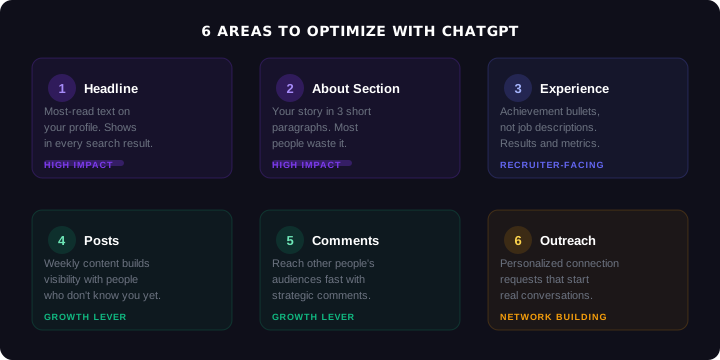
Step 1: Rewrite Your Headline
Step 2: Fix Your About Section
Step 3: Sharpen Your Experience Bullets
Step 4: Write Posts That Get Seen
Step 5: Comment Your Way to Visibility
Step 6: Write Connection Requests That Get Accepted
What Mistakes Should You Avoid When Using ChatGPT for LinkedIn?
FAQ
What Are the Two Jobs Your LinkedIn Has to Do?
LinkedIn functions as two completely different things at the same time, and most profiles fail at both.
The first is a search engine. Recruiters search LinkedIn by keywords: job titles, skills, tools, industries. If those terms aren't in your headline, About section, and experience bullets, you don't show up. It doesn't matter how impressive your background is if the profile isn't indexed for the right searches. LinkedIn reports that users with complete profiles are 40 times more likely to receive opportunities through the platform.
The second is a social feed. When you post, comment, or engage, your name appears in front of people who don't know you yet. A strong profile converts those impressions into connection requests, messages, and opportunities. A weak one gets ignored even when people do click through.
ChatGPT helps you solve both problems. The prompts in this article are organized by section, covering the profile for search visibility and the content for social presence. Use them in order the first time, then come back to individual sections as you need them.
1 Rewrite Your Headline
Your headline is the most-read text on your profile. It appears in search results, connection requests, comment threads, notifications, and the feed. Most people use it for their current job title and company name. That's fine for showing where you work. It does nothing to make you interesting.
A strong headline answers three questions in under 220 characters: what you do, what makes you worth clicking on, and who you're relevant to. That's a lot to pack in. ChatGPT is good at this kind of constraint-driven writing.
My name is [Name]. I'm a [job title] with [X years] of experience in [industry or niche]. My strongest results include: [list 2-3 real, specific achievements - numbers help]. I am currently [open to new roles / building in stealth / growing my network in X field].
Write my LinkedIn headline in 3 variations: (1) results-focused, leading with what I've achieved, (2) role plus specialization plus what I'm seeking, (3) value-first, leading with what I offer a company or client. Each should be under 220 characters. No buzzwords, no "passionate about," no "results-driven."
Here's the difference between a headline that gets ignored and one that earns clicks:
Project Manager | PMP Certified | Delivering Projects on Time
Senior PM | Shipped 4 fintech products in 18 months | Open to senior PM roles in payments
The "before" tells me your title and a generic claim. The "after" tells me your specialty, a real result, and what you're looking for. A recruiter hiring for fintech product roles will stop on the second one.
2 Fix Your About Section
The About section is the one place on LinkedIn where you get to write in full sentences and actually say something. Most people waste it. They list adjectives ("I am a collaborative, detail-oriented professional...") or summarize their resume ("Over 7 years in technology...") without saying anything memorable.
The structure that works is simple: what you actually do in plain language, proof that you're good at it, and what you're looking for or offering. Three short paragraphs, under 300 words, written like a human being.
I'm writing my LinkedIn About section. Here's my background in my own words: [paste your actual career history, results, and context - messy notes are fine].
My target audience is [recruiters hiring for X / potential clients in Y / peers in Z field]. My goal on LinkedIn is [get hired for a senior PM role / attract inbound consulting opportunities / build my professional network in fintech].
Write a 3-paragraph About section that: opens with what I actually do in plain language (not "I am a passionate..."), includes 1-2 specific results or credentials, and ends with a clear signal of what I'm looking for or what I offer. Direct, confident tone. No filler phrases. Under 300 words.
To show you the difference, the same project manager from the headline example:
I am an experienced Project Manager with 7+ years in the technology sector. I have a proven track record of delivering projects on time and within budget. I am a strong communicator with excellent stakeholder management skills. I am currently seeking new opportunities.
I manage the gap between what a product team plans and what actually ships. For the past 7 years, I've been the person who keeps cross-functional teams aligned, unblocks engineers, and makes sure product decisions don't stay in Notion forever.
Most recently I led a $2M platform migration at a fintech startup across 4 squads, delivered on schedule with zero scope creep. Before that, 3 years delivering digital transformation for retail and banking clients at an agency.
If you're building a product org that needs someone who can run a tight process without killing team momentum, my inbox is open.
Same person, same background. One reads like a job application. The other reads like someone worth talking to.
Want every LinkedIn prompt pre-built in one system?
The LinkedIn Growth System has 18 prompts organized by area: profile optimization, content creation, networking outreach, and advanced visibility plays. Every prompt structured and ready to use.
See the LinkedIn Growth System3 Sharpen Your Experience Bullets
Experience bullets are the most-scanned section of any LinkedIn profile. Recruiters read them fast. What stops the eye is a specific result, not a list of responsibilities. "Managed cross-functional team" says nothing. "Led a 6-person team through a 4-month sprint that shipped two months ahead of schedule" says something.
Most people write job descriptions. The goal is achievement statements.
Here are my responsibilities and results at [Company] as [Job Title]: [paste your rough notes, however unpolished].
Rewrite this as 3-5 bullets for my LinkedIn experience section. Each bullet should: start with a strong action verb, include a specific result or metric where possible, be under 2 lines, and be written for a recruiter hiring for [target role]. No passive voice. No "responsible for."
If you don't have metrics, that's fine. "Led the migration of our project tracking system from Jira to Linear, cutting sprint planning time by 40%" is ideal, but "Led the migration of our project tracking system, reducing planning overhead significantly" is still better than "Managed project tools."
4 Write Posts That Get Seen
LinkedIn posts have a specific format that performs well: a hook that makes someone stop scrolling in the first line, short punchy paragraphs, a clear point of view, and something worth responding to at the end. Most people either write long essays nobody finishes or they don't post at all.
ChatGPT is genuinely useful here, not to write the posts for you from nothing, but to take your rough idea and shape it into something readable. Give it the experience or insight you want to share, tell it who you're talking to, and ask for multiple formats.
I want to write a LinkedIn post about: [describe the experience, lesson, or observation you want to share - be specific, even if the notes are rough].
My audience is [job seekers / PMs / tech professionals / hiring managers]. Write 3 variations: (1) hook-forward, opening with a line that makes someone stop mid-scroll, (2) short story format, a quick narrative with a practical takeaway, (3) list format, 3-4 concrete points. Each should be under 200 words. Conversational tone. No corporate buzzwords. End each with something that invites a response.
One thing to watch: AI posts have a recognizable flavor when left unedited. They're grammatically perfect, oddly formal, and they never say anything surprising. Read the output, then add one line only you could write: a specific detail, a genuine opinion, something that didn't come from the prompt. That's what makes it yours.
5 Comment Your Way to Visibility
Strategic commenting is one of the fastest ways to grow on LinkedIn without posting every day. When you leave a substantive comment on a post from someone with a large following, their entire audience sees your name and what you said. A good comment is a micro-post in front of someone else's audience.
The problem is most comments are useless. "Great post!" and "Totally agree!" add nothing and get ignored. A comment that adds a perspective, shares a quick experience, or asks a smart follow-up question gets noticed by the original poster and by everyone reading the thread.
I want to comment on this LinkedIn post: [paste the post].
I'm a [job title] with experience in [your area]. Give me 3 comment options: (1) adds a different or contrasting perspective, (2) shares a short relevant personal experience, (3) asks a thoughtful follow-up question that continues the conversation. Each should be 2-4 sentences. Natural, conversational tone. Not sycophantic.
Use this on posts from people in your target industry, from recruiters at companies you want to work at, and from thought leaders whose audience overlaps with who you want to reach. Ten minutes of strategic commenting per day compounds faster than most people expect.
6 Write Connection Requests That Get Accepted
The default connection request ("I'd like to add you to my LinkedIn network") gets ignored because it says nothing. A message that's specific about why you're connecting gets accepted, and sometimes starts a conversation.
ChatGPT can help you write personalized messages quickly. The key input is context: who this person is, what you have in common, and why it makes sense to connect now.
I want to send a connection request to [describe who: recruiter at X company, PM lead at Y startup, someone I met at Z conference, someone whose post I found interesting].
Context: [why you're connecting, what you have in common, or what prompted the request].
Write a 3-4 sentence message that: mentions something specific about them or their work, explains briefly why I'm reaching out, and doesn't ask for anything. Friendly and professional. Not salesy.
What Mistakes Should You Avoid When Using ChatGPT for LinkedIn?
Giving it no personal context. If you paste a job description and ask for an About section, you'll get something generic. The prompt needs your real background, real results, and real goals. Garbage in, garbage out.
Using the output without editing. AI-written copy has a consistent flavor that experienced readers recognize. Read everything out loud. Change anything you'd never actually say. Add at least one specific detail that could only come from you.
Optimizing your profile once and never touching it again. LinkedIn is a living document. Update your headline when your focus shifts. Add new achievements to experience bullets. Your profile from two years ago is probably already misrepresenting you.
Posting in bursts then going quiet. Consistency is the actual driver of LinkedIn growth. One post per week for three months outperforms ten posts in two weeks then silence. Use ChatGPT to make the weekly rhythm easy enough that you actually maintain it.
If you want the full set of LinkedIn prompts pre-built and organized by section, the LinkedIn Growth System covers profile, content, networking, and advanced visibility plays in one place.
Frequently Asked Questions
Yes, but not without your input. ChatGPT can write every section of your LinkedIn profile, but the output is only as good as what you give it. If you paste in a job description and ask for an About section, you'll get something generic that sounds like everyone else. If you give it your real experience, specific results, and what you're actually looking for, the output becomes something that genuinely represents you.
Not if you edit it. AI-written copy has a recognizable flavor when left unedited: overly formal, slightly generic, no personal quirks. Read the output out loud. Change anything you'd never actually say. Add one specific detail only you would know. After that pass, it reads like you, not a machine.
Give it your job title, your 2-3 best results, your target audience (recruiters, clients, peers), and what you're currently looking for. Then ask for 3 headline variations: one results-focused, one role plus specialization, one value-first. Pick the one that sounds most like how you'd actually introduce yourself at a networking event.
Once a week is enough to build visibility without burning out. Consistency matters more than frequency. Three months of one post per week does far more than a burst of daily posts for two weeks then silence. Use ChatGPT to reduce the time each post takes so you can maintain the rhythm without it feeling like a second job.
ChatGPT (free or Plus) is the most practical option for most people. Claude handles longer documents better if you're rewriting a full profile in one session. Both work well for headlines, About sections, and posts. The tool matters less than your inputs. Rich, specific context beats a premium AI subscription every time.

Get the full LinkedIn system, already built.
The LinkedIn Growth System has 18 structured prompts covering every section of your profile, a weekly content routine, networking scripts, and advanced plays for growing your audience. $18.99, instant access.
Get the LinkedIn Growth System