- AI won't find you a job, but it removes every bottleneck that slows most job seekers down.
- The biggest mistake: asking AI to write your resume from scratch. The biggest win: giving it your real results and letting it present them clearly.
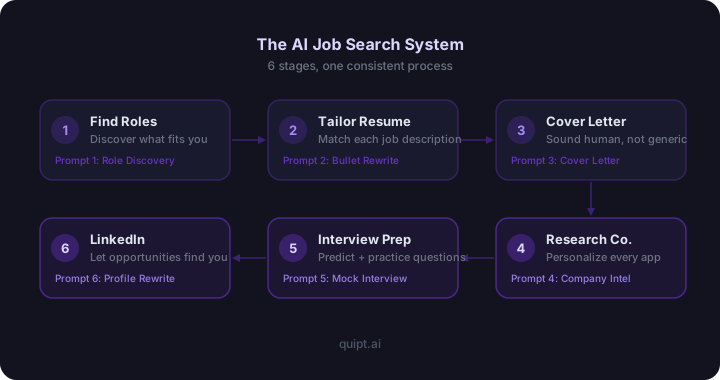
- Every stage of the search (roles, resume, cover letter, research, interview, LinkedIn) can be accelerated with a focused prompt.
- A system beats one-off prompts. Job seekers who use AI consistently across every stage apply faster and waste less energy on the wrong roles.
- Your experience is the raw material. AI's job is to help you present it clearly, not invent a career you don't have.
I'll be honest with you: I didn't use AI when I was searching for jobs. I used it for other things: drafting emails, brainstorming, squeezing more out of fewer hours. But the job search itself? I did it the old way, and it was brutal in ways it didn't need to be.
I've watched enough people go through the process now to see what separates the ones who land faster from the ones who grind for months. It's not credentials. It's not connections. In almost every case, it comes down to preparation and personalization, and both of those are exactly where AI changes the equation.
Most people use AI for one thing: the cover letter. They paste a job description, ask ChatGPT to write something, skim the output, and send it off. It's better than nothing. But it's leaving most of the value on the table.
The real opportunity is using AI as a system, one that touches every stage of your search. Finding the right roles before you apply. Tailoring your resume for each job description. Writing cover letters that sound like you, not a template. Researching companies deeply before you even send an application. Preparing for interviews. Optimizing your LinkedIn so opportunities come to you.
This article is the complete AI job search system. Every step, every prompt, with before/after examples so you can see exactly what the difference looks like in practice.
Step 1: Find Roles That Actually Match Your Skills
Step 2: Tailor Your Resume for Every Job Description
Step 3: Write Cover Letters That Don't Sound Like AI
Step 4: Research Companies Before You Apply
Step 5: Prepare for Interviews
Step 6: Optimize Your LinkedIn Profile
Which AI Tools Work Best for an AI Job Search?
What Mistakes Should You Avoid in Your AI Job Search?
FAQ
Why Most People Use AI Wrong in Their Job Search
The most common pattern I see: someone opens ChatGPT, pastes a job description, types "write me a cover letter for this," reads the output, makes one or two small edits, and sends it. Sometimes they do the same with their resume.
The result is content that sounds competent and says almost nothing. It uses the right words from the job description. It has the right structure. And it reads exactly like every other AI-written application in the recruiter's inbox, because it was generated from the same inputs, with no personal context, no real achievements, and no reason for anyone to lean forward.
The problem isn't AI. The problem is how it's being used. AI is a drafting and structuring tool. It can take your messy, half-formed thoughts and turn them into clear, compelling copy. But it can't manufacture experience you don't have, results you haven't achieved, or genuine interest in a company you haven't researched. That part is yours to bring.
When you give AI real material to work with: specific achievements, honest context, actual reasons you want this role, the output becomes something no other candidate can replicate, because no other candidate has your exact experience. That's the shift that turns AI from a shortcut into a genuine advantage.
The stakes are real. According to Indeed, the average job search takes three to six months. The gap between people on the shorter end and those grinding through the full six months almost always comes down to how well they prepare and personalize at each step. AI closes that gap fast when used correctly.
Want the full AI job search system already built for you?
The AI Job Search System has every prompt in this article pre-structured, plus resume tailoring templates, cover letter frameworks, interview prep scripts, and a LinkedIn optimizer. One system for every stage of the search.
See the AI Job Search System1 Find Roles That Actually Match Your Skills (Before You Scroll Job Boards)
Most job seekers start the search backwards. They pick a job title, search it on LinkedIn or Indeed, and scroll through hundreds of listings without a clear sense of which ones are genuinely a good fit for them. They apply to everything that seems possible and hear back from almost none of it.
A better starting point: use AI to analyze your experience first, then identify which roles and titles are the strongest match, including ones you might not have thought to look for.
I'm planning a job search and want to find the roles that are the best fit for my background before I start applying. Here is a summary of my experience: [paste a short summary - your most recent roles, your strongest skills, any notable results or achievements] Based on this, give me: 1. The 5 job titles I should be targeting (including ones I might be overlooking) 2. For each title: why it fits my background, what gaps I might need to address, and where to look for these roles 3. One role I'm probably underestimating my fit for, and why 4. One role I might be targeting that's a harder sell than I think, and why
What this does is force you to think strategically before you spend energy applying. It surfaces relevant roles you might not know exist, names the gaps you'll need to address in your application, and sometimes tells you something useful and uncomfortable, like that the title you've been targeting is more competitive than your background warrants right now, or that a lateral move into a different function might actually accelerate your career more than the obvious next step.
In my experience, the biggest job search mistake isn't sending bad cover letters. It's spending weeks applying to the wrong roles in the first place. This prompt helps you avoid that.
2 Tailor Your Resume for Every Job Description (Without Rewriting It Each Time)
Here's the reality of resume screening in 2026: most applications get filtered by an ATS (Applicant Tracking System) before a human ever sees them. If your resume doesn't reflect the language in the job description, not stuffed with keywords, but genuinely aligned - it may never reach a recruiter's eyes.
Tailoring a resume from scratch for every application is exhausting and most people don't do it. AI makes it possible without starting over each time.
The right approach: keep a "master resume" with every achievement, bullet point, and role you've ever had. Then for each application, use AI to select and rewrite the most relevant bullets for that specific job description.
I'm applying for a [Job Title] role. Here is the job description: [paste the full job description] Here are my raw resume bullet points from my current role: [paste your existing bullets, as rough as they are] Rewrite the 4 most relevant bullets to: - Match the language and priorities in the job description - Lead with the impact or result, not the task - Include specific numbers where I've provided them - Use plain, direct language - no buzzwords or passive voice - Stay under 2 lines each Also flag any keywords from the job description that are missing from my bullets that I should add (only if they're genuinely accurate for me).
What a tailored bullet actually looks like
"Responsible for managing project timelines and coordinating with stakeholders across multiple departments to ensure deliverables were completed on time."
"Led cross-functional rollout of a new project tracking system across 4 departments - delivered 3 weeks ahead of schedule and cut status meeting time by 40%."
The second bullet describes the same work. But it leads with impact, has a number, and tells the reader something memorable. Recruiters spend an average of 7 seconds on an initial resume scan. The first bullet blends in. The second stops them.
One thing I want to be honest about here: AI can strengthen your language and structure, but it can't invent numbers you don't have. If you genuinely don't know the metric, include the scope instead: team size, budget, number of stakeholders, scale of the project. Context without numbers is better than fabricated ones.
3 Write Cover Letters That Don't Sound Like They Were Written by AI
The irony of AI cover letters is real: the more people use AI to write them, the easier it becomes to spot the ones that were written by AI. Recruiters who read dozens of applications a day have developed a reliable radar for certain phrases. "I am excited to apply for..." "My passion for..." "I believe I would be an excellent fit..." These openers are everywhere, and they signal nothing.
The fix is not to avoid AI, it's to give AI the right inputs. A cover letter that sounds like you requires you to tell it something about you: a specific reason you want this company, a concrete result you're proud of, a genuine connection to what this role actually does.
Write a cover letter for a [Job Title] role at [Company Name]. Here is the job description: [paste the job description] About me and my genuine interest in this role: - Most relevant experience: [your actual background in 2-3 sentences] - A result I'm proud of that's directly relevant: [one specific achievement with a number if possible] - Why this company specifically (not generic): [something real - their product, their mission, a campaign they ran, a problem you know they're solving] Requirements: - 3 short paragraphs, under 250 words total - Open with the most compelling thing about my fit for this role - not "I'm excited to apply" - Sound like a confident human, not a polished application template - Avoid: passionate, excited, excellent fit, leverage, synergy, dynamic, results-driven - End with one clear next step - not "I look forward to hearing from you"
The opening line is everything
"I am excited to apply for the Project Manager position at [Company]. As a results-driven professional with experience managing complex projects, I believe I would be an excellent addition to your team."
"I've spent the last 4 years managing product launches across 3 markets - which is exactly why your job description, with its emphasis on cross-functional alignment and tight delivery cycles, reads like a role built for how I work."
The second opener isn't just better copy. It does something the first one doesn't: it makes the recruiter feel like this applicant actually read the job description and connected it to their real experience. That feeling, that this person gets it, is what gets you to the next round.
After AI drafts the letter, read it out loud. Change anything you'd never actually say. That edit pass is where the cover letter becomes yours.
4 Research Companies Before You Apply (Not Just Before the Interview)
Most people do company research the night before an interview. The smarter move is to do it before you apply, because what you learn might change how you position yourself in the cover letter, which bullet points you lead with, or whether you apply at all.
AI is useful here not because it knows everything about a company (it doesn't, its knowledge has a cutoff date), but because it helps you structure your research and tells you what to look for. Then you verify with current sources.
I'm applying for a [Job Title] role at [Company Name]. Based on what you know about this company, help me understand: 1. What are their main products or services, and who are their customers? 2. What are the most likely business challenges or priorities for this team right now? 3. What does this role probably exist to solve - what problem is it hired to fix? 4. What should I research further to make my application more specific (news, campaigns, hires, product launches, competitors)? 5. One angle for my cover letter that most applicants probably won't use Note: I will verify all of this with current sources before using it.
The last instruction in that prompt matters. AI can hallucinate company details, reference outdated information, or confuse two companies with similar names. Treat what it gives you as a research starting point, not a final source. Then go verify on the company's website, LinkedIn, press releases, and any recent news.
What this research does for your application is make it specific in a way that generic applications never are. When a hiring manager reads a cover letter that references something real about their company's direction, their product, or their market, not a generic compliment, but something that shows you actually looked - it changes how they read the rest of your application.
5 Prepare for Interviews With AI
Interview preparation is where AI has the clearest, most documented advantage for job seekers. And it's also where I've written a full separate guide, because this topic deserves more than a single section.
The short version: AI can predict 70-80% of the questions you'll face if you give it the job description. It can build your STAR stories from raw notes. It can run a mock interview, but only if you explicitly tell it to be harsh, because by default it will agree with everything you say and call your answers excellent. That's the part most guides miss.
For the full system with every prompt, before/after examples, and a night-before checklist, read: How to Use ChatGPT to Prepare for a Job Interview (My Exact 5-Step System).
The candidates who get hired faster aren't the ones with the best resumes. They're the ones who walk into the interview knowing exactly what they're going to say, and why.
6 Optimize Your LinkedIn Profile So Opportunities Come to You
Most job seekers treat LinkedIn as a place to apply. The better play is to make it a place that brings applications to you. Recruiters searching for candidates actively use LinkedIn's search filters, and if your profile isn't optimized for those searches, you're invisible to a significant part of the market.
The two highest-leverage parts of your LinkedIn profile are the headline and the About section. The headline is what shows up in search results and feeds. The About section is what a recruiter reads when they click on you to decide if they want to reach out.
Rewrite my LinkedIn headline and About section to attract recruiters for [target role type] positions. My background: - Current/most recent title: [your title] - Years of experience: [X years] - Strongest skills: [list 3-5] - One result I'm proudest of: [specific achievement with a number] - Types of roles I'm targeting: [be specific] For the headline: - Under 220 characters - Include the job title I'm targeting, one key skill, and one differentiator - Avoid: "Passionate about", "results-driven", "thought leader" For the About section: - Under 300 words - First line hooks a recruiter who is skimming - Second paragraph covers what I do and my strongest proof point - Final line is a clear call to action (open to roles, DM me, etc.) - Write in first person, sound like a confident human
The headline most people write vs. the one that gets clicks
"Project Manager at [Company] | PMP Certified | Passionate about delivering results"
"Senior Project Manager | Cross-functional launches, 8+ markets | Currently open to PM roles in SaaS or fintech"
The second headline tells a recruiter immediately: what you do, the scale you operate at, and what you're looking for. It's searchable (Senior Project Manager, SaaS, fintech) and it filters in the right people. The first headline is indistinguishable from thousands of others with the same title.
Beyond the headline and About, make sure your job titles and company names match how recruiters search for them, your skills section includes the specific tools and methodologies relevant to your target roles, and your featured section has at least one piece of work or achievement that makes a recruiter stop scrolling. For a deeper walkthrough on every section, read How to Use ChatGPT for LinkedIn.
Which AI Tools Work Best for an AI Job Search?
You don't need six different AI subscriptions to run a serious job search. Most of what's in this guide works with ChatGPT Free. Here's a quick breakdown of where each tool adds the most value:
| Stage | Best Tool | Why |
|---|---|---|
| Role discovery | ChatGPT (Free or Plus) | Good at structured analysis and listing options |
| Resume tailoring | ChatGPT or Claude | Both handle bullet rewrites well; Claude is better with longer context |
| Cover letters | Claude | Stronger on tone and sounding human over long-form writing |
| Company research | ChatGPT (with web browsing) or Gemini | Real-time search access helps with current company context |
| Interview prep | ChatGPT Plus | Best for mock interviews; voice mode useful for spoken practice |
| ChatGPT or Claude | Either works; Claude tends to produce more natural-sounding copy |
If you want a single tool that covers everything without needing to build each prompt yourself, the Quipt AI Job Search System has every prompt pre-structured for each stage with instructions built in. But if you're running this yourself, ChatGPT Free handles the majority of it.
What Mistakes Should You Avoid in Your AI Job Search?
After seeing how people actually use AI in their job search (and where it consistently goes wrong), here are the patterns worth avoiding:
- Giving AI no personal context. "Write me a cover letter for this job" produces generic content because you gave it nothing personal to work with. The prompt quality determines the output quality.
- Using the same application for every role. AI makes personalization fast, there's no longer a good excuse not to tailor each application. A resume that's 80% the same but with the right 20% tailored for each role outperforms a fixed document every time.
- Not editing the output. AI drafts need your voice. Read every output out loud. Change the phrases you'd never use in conversation. The edit pass is not optional, it's where you make it yours.
- Using AI only for the cover letter and ignoring the rest. Cover letters matter less than most people think. The resume gets you through the filter, the interview gets you the offer, and LinkedIn brings opportunities you never applied for. AI helps with all of it.
- Trusting AI's company facts without verifying. AI can hallucinate details about companies, especially smaller or faster-moving organizations. Anything that goes into your cover letter or interview prep needs to be verified against current sources.
The thing most job seekers miss about using AI
The goal of AI in your job search isn't to do the work for you, it's to remove every excuse not to be prepared. Not tailoring your resume because it takes too long is no longer a valid reason. Not researching the company before applying because it takes too long is no longer a valid reason. AI collapses the time cost of preparation. What you do with that time is still up to you.
Get the full AI job search system in one place.
Every prompt in this article is pre-built in the Quipt AI Job Search System, plus resume tailoring templates, cover letter frameworks, interview prep scripts, LinkedIn optimizer, and a structured workflow for each stage. Stop building prompts from scratch every time you apply.
Get the AI Job Search SystemFrequently Asked Questions
Yes, but not by magic. AI speeds up every stage that normally slows job seekers down: researching roles, tailoring resumes, writing cover letters, prepping for interviews. The people who use it as a system (not just for one cover letter) consistently apply faster, prepare better, and waste less energy on applications that don't fit.
Yes, with one condition: give it your real experience and results, not just the job description. AI is a drafting tool, not an experience generator. If you paste a job description and ask for a resume, you'll get something generic. If you paste your actual achievements and ask AI to present them clearly for this specific role, you'll get something that works.
ChatGPT (free or Plus) covers 90% of what you need. Claude is useful for longer documents like detailed cover letters or LinkedIn rewrites where tone and context matter more. Gemini integrates with Google Docs if that's part of your workflow. For a structured, guided experience with every prompt pre-built, Quipt's AI Job Search System has each stage already set up.
Tell it your voice, not just your job. Include a line like: "Write in a direct, confident tone. No corporate buzzwords, no filler phrases, no passive voice." Then edit the output yourself, read it out loud and change anything you'd never actually say. AI gives you a structure. You make it yours.
Using it to write everything from scratch with zero personal context. They paste in a job description, ask for a resume, and get something that sounds like every other AI-written resume in the pile. The fix is to give AI your real results, your actual stories, your genuine reasons for wanting the role, and use it to shape and sharpen that material, not create it from nothing.